October 20, 2026
See the status of every session
Each session and add-on now has its own status. A camper can be confirmed for Week 1 and waitlisted for Week 3, and your team and their family see both.
On every camper’s record
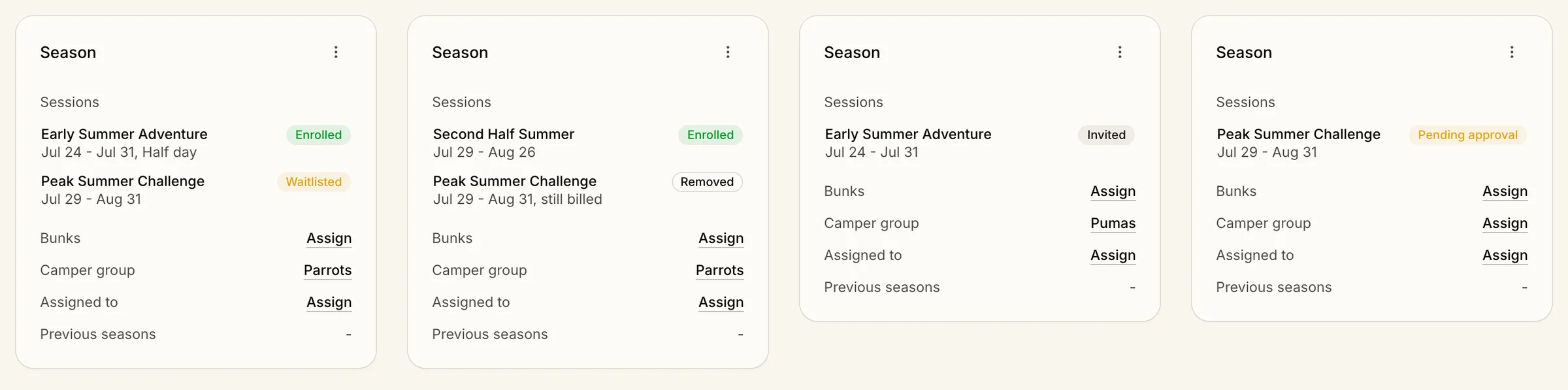
Set a session to Confirmed, Waitlisted, or Pending approval in Edit season information, from the camper’s Season card. Invited is set when you send an invitation, and unticking a session marks it Removed. To change what a family pays, use Billing.
Confirmed and invited campers hold a seat. Waitlisted and pending ones don’t. Each camper still has an overall stage, like Enrolled.
In your tables and for families
Add a status column for any session, or columns like Enrolled sessions and Invited sessions, then filter by them. Families now see their camper’s sessions on their dashboard, with waitlisted, invited, and pending ones labeled.